Designing a 0 → 1 application for estate* lawyers
0-1 application
founding designer
designing for AI
LawyerDoneDeal is a company building legal tech products that optimize workflows for lawyers and law clerks in Canada.
I was the sole leading designer for a new 0 → 1 application for estate* lawyers in Ontario to help them gather and organize client financial documents into court ready litigation documents.
* the type of law has been altered as a result of a NDA
TEAM:
1 product designer
4 developers
1 project manager
8 legal consultants





role
I was the sole leading designer that shaped this product from 0 → 1. I joined the project during the proof of concept phase and currently working on refining functionality for launch.
I owned the legal research and design end-to-end, independently interpreting and navigating the provincial and federal legislation to transform a complex financial disclosure process into an intuitive experience .
projected IMPACT
Gaining Industry Traction
The product is in active development as I continue designing new workflows, maintain Figma files, write product requirements, and collaborate closely with developers as they work towards the MVP.
Despite being pre-launch, it is attracting institutional attention at the court and judicial level. I am also currently presenting in monthly discussions with Ontario estate* law firms regarding software functionality and legal compliance.
* the type of law has been altered as a result of a NDA
problem
Canada's estate* legal software market has one dominant player charging over $200 per user per month, leaving smaller firms underserved. LawyerDoneDeal wanted to capitalize on this narrow market and provide lawyers from smaller firms better access to estate* legal software for by creating a competitive product for the market.
When I spoke with eight Ontario lawyers, every single one described the same experience: gathering and organizing client financial documents is the most critical part of their work, and the most tedious. Clients rarely provide everything the first time, leading to repeated phone and email follow-ups. Once documents arrive, lawyers manually sort them to prepare for court.
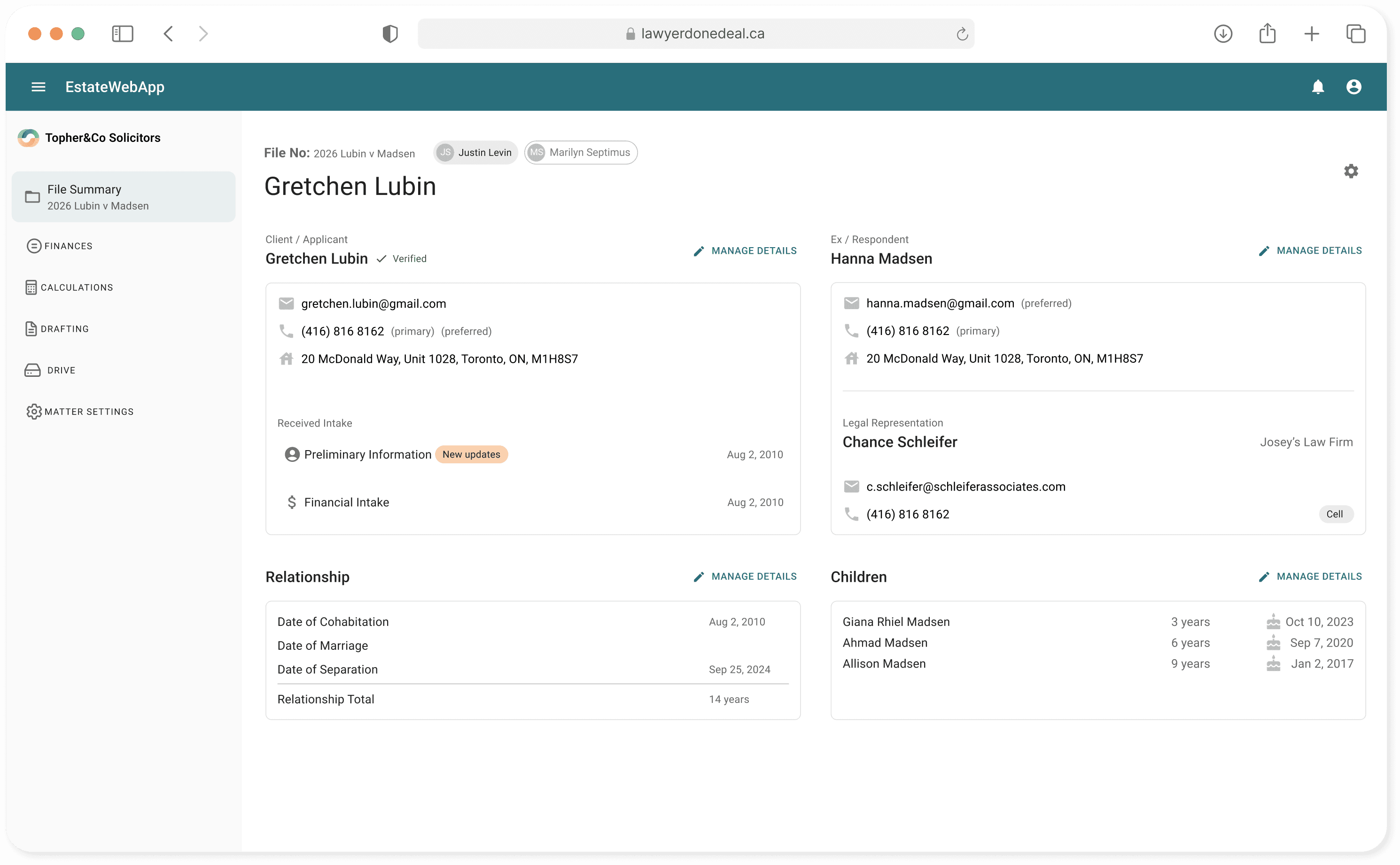
We built a web app that estate lawyers can use to organize these financial documents into a court-ready manner so that they can spend more time drafting legal documentation than spend billable hours on administrative filing work.

key challenges
This was a new market for the company, and no internal expertise existed to guide the product direction. While legal consultants were available, their billing rates made frequent access impractical. As a result, i had to:
independently interpret Ontario family law legislation
translate legislation to workflows to product requirements
write all feature specifications and vet all changes as I was the sole person in the company with domain knowledge
ensure all designs were legally compliant from day one
navigate tax legislation once the product touched client finances (eventually onboard an intern to take over that research)
maintain continuity and context across a shifting development team
The development team also rotated in and out of the project as competing priorities across LDD's main software shifted resourcing. I had to maintain continuity and context across a team that changed throughout the project.
solution
Owning Continuity
As the sole designer and knowledge holder for the entire product, I found myself needing to ensure I maintained project continuity despite navigating competing company resources.
I continued to:
write and keep documentation requirements current so new team members could onboard quickly
keep Figma files up to date and annotated
write detailed ticket specs and user stories so the product backlog becomes the source of truth
track bugs as I found them
maintain communication with developers and their project mangers as their capacity opened up across sprints
product design
Aligning the MVP
Our discovery calls with legal consultants surfaced a wide range of features, workflows, and pain points. With my design manager, I mapped the existing legal workflow with associated pain points. This gave the team a shared foundation to design, prioritize, and make decisions from.

Repeated phone and email follow ups
Lawyers and their clerks spend hours explaining and re-explaining to their clients what information and documentation they require from them.

Client documents require court-compliant organization
Documentation that was sent in by client need to be organized and filed in accordance to legal and court standards.
With the pain points defined, I looked at how LDD's existing software capabilities could be applied to what lawyers actually needed and identified where we would need to design something entirely new. This kept the scope realistic and reduced unneccesary development from the start.

A whiteboarding session detailing the lawyer's current workflow and pain points, ideated proposal on how we can incorporate existing technology, and feature MVP suggestions.
Designing for AI Readiness
The company's focus was on leveraging AI to make the legal workflow more efficient by using AI to read and extract information from legal documents. However, training this model required significant development time and curated resources that weren't yet available at the MVP stage.
To maintain project momentum, I decided to design a modular concept that could serve both timelines. Each section of the interface was built as a self-contained unit, allowing users to manually fill it in today, but the design would accept AI-populated data in the future.
I leaned into the MUI library in order to build a component-based design system and reused established patterns as much as possible. This kept the interface familiar to users and ensured each module could be extended incrementally as the AI layer was introduced.

Collaboration
I worked closely with developers and the project manager by reviewing the backlog, prioritizing tickets, and ensuring every build went to spec. To assist developers focused on backend programming, I used AI tools like Claude and Cursor to assist with frontend adjustments like refining typography, colours, and padding to keep the product as 1:1 to the Figma design as possible
Since I also held the deepest product knowledge on the team, I became the onboarding resource, disseminating legal context to programmers new to the project and document specialists responsible for generating court-ready output.
I maintained monthly touchpoints with legal consultant stakeholders who were positioned to advocate for the product in the Ontario legal community and worked closely alongside our intern to interpret and operationalize new legislation as the product evolved.

next steps
This project required a level of ownership I hadn't exercised before. I'm currently designing from zero in a regulated domain while managing delivery, conducting research, and contributing to the codebase simultaneously. Development is ongoing, and my involvement spans the full breadth of the product.
Although the product has not yet launched, it is already being evaluated at the court and judicial level. At scale, this platform has the potential to meaningfully reduce the administrative overhead while providing smaller law firms another avenue to provide their clients with access to justice.